FOR CHARITIES · LEARN MORE

Fundraising that feels simpler from day one.

Build a donation page, run campaigns, manage GoCardless donations and regular giving, and prepare Gift Aid claims—without switching between disconnected tools.

Currently in Sandbox testing. Demo data only; real payments are not enabled.

GoCardless connectedCampaign readyGift Aid workflows
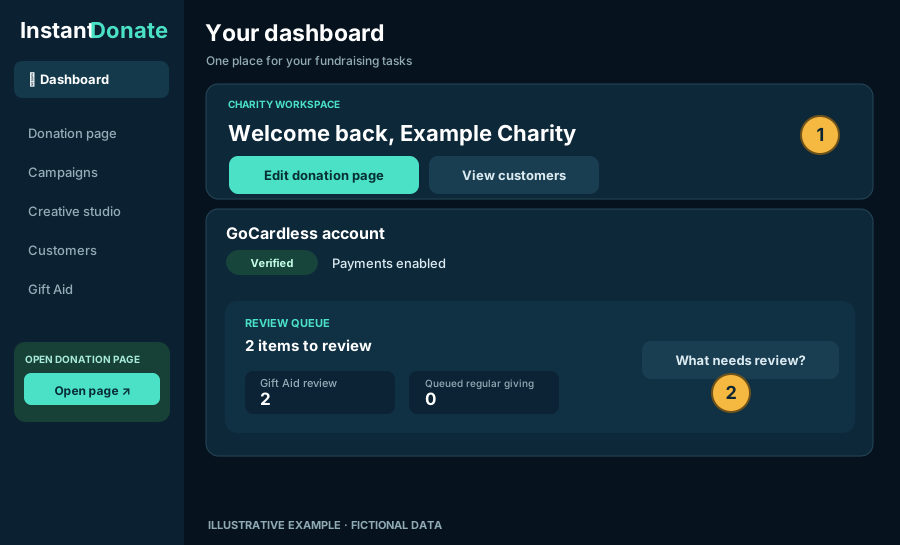
CHARITY WORKSPACESANDBOX
Illustrative example of InstantDonate's charity dashboard with donation-page tools, GoCardless verification and a review queue
One workspace. Clear next steps.Illustrative example
Design without complexityStart simple, customise when you need to
Connected to GoCardlessHosted payment and mandate authorisation
Actionable supporter recordsFollow up where attention is actually needed
BUILD · PROMOTE · MANAGE

More than a donation page.

Every feature is built to help charities get something done, without cluttering the workspace with unnecessary information.

✦

Branded donation pages

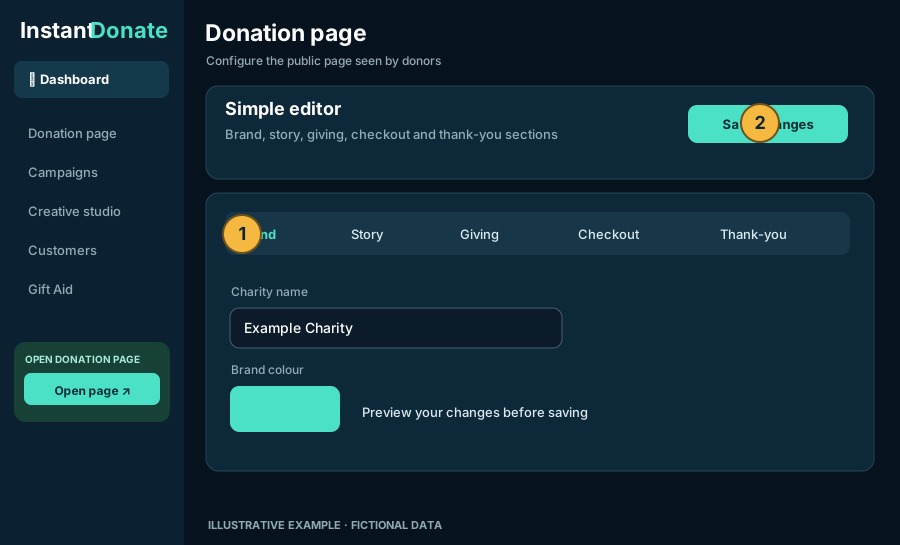
Start with a guided editor, then choose advanced design controls for your story, giving amounts, checkout and thank-you message.

  • Flexible brand colours, layouts and messages
  • Suggested donation amounts and impact copy
  • One-off and regular giving options
  • Preview before saving
See how the page editor works →
Illustrative donation-page editor showing brand, story, giving, checkout and save controls
◎

Campaigns with their own goals

Create appeals with targets, imagery, messages and optional dates. Share dedicated campaign links and display confirmed donation progress.

TargetsUpdatesCampaign links
Explore campaigns →
▣

Creative Studio & QR codes

Create print-ready posters and campaign-linked social graphics. Use brand colours, logos, photos, QR codes and layouts without starting from scratch.

Social graphicsPostersPDF
Explore Creative Studio →
CUSTOMERS & REGULAR GIVING

Every customer, payment and mandate in context.

Instead of hunting across individual GoCardless payments and subscriptions, open a customer and see their connected bank-account references, mandates, regular giving, payments and Gift Aid information together.

See what matters nowKeep cancelled and failed history tucked away until you need it.
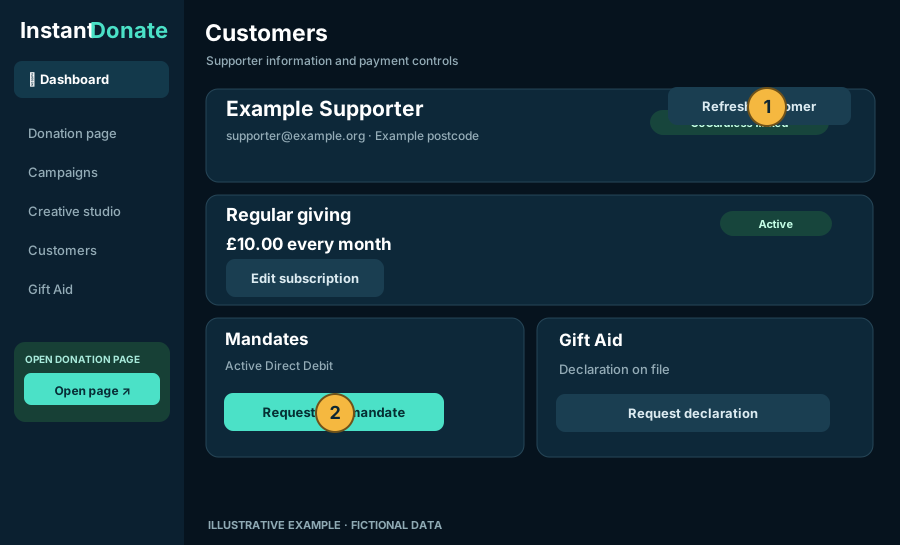
Stay up to dateSee when a customer last synced via webhook or manual refresh, and refresh without losing your place.
Take the next actionRequest a replacement mandate, manage subscriptions, or review eligible refunds and failures.
How customer management works
Illustrative customer workspace showing active regular giving, mandates, Gift Aid and refresh controls
Example customer workspace · Fictional supporter details
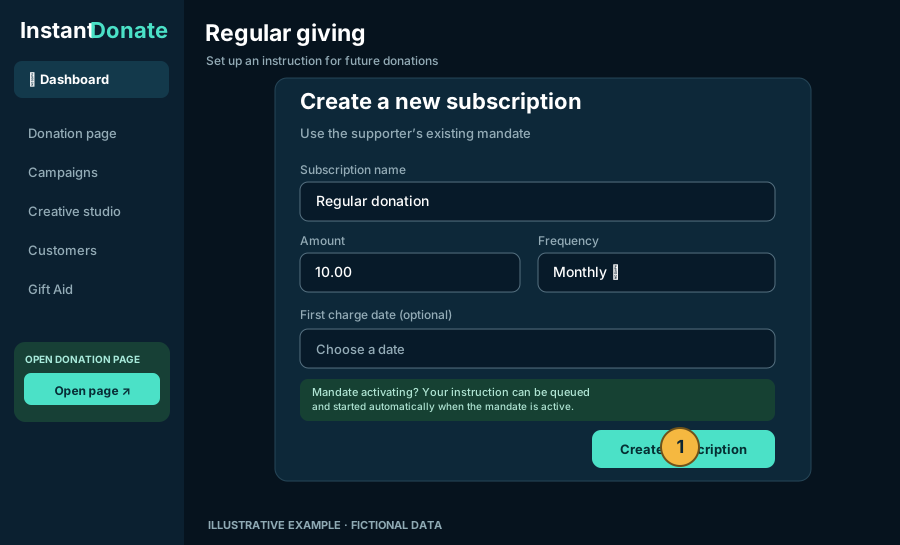
Example create-subscription form with monthly amount, frequency and first charge date
Example subscription setup · Fictional values
BETTER REGULAR GIVING

Help supporters keep giving.

From the customer record, charities can request a new GoCardless Direct Debit mandate and set up or manage regular donations.

New subscriptionChoose the amount, frequency and optional first charge date.
Awaiting mandatePrepare a regular-giving instruction while a supported mandate is still activating.
Manage changesEdit, pause, resume or cancel eligible subscriptions without leaving the customer.
Recover failed paymentsReview the reason and available next steps rather than retrying indiscriminately.
See the regular-giving guide
GIFT AID, MADE CLEARER

From donor declarations to HMRC-ready files.

Keep track of Gift Aid alongside customer payments, instead of relying on disconnected spreadsheets to decide which donations can be claimed.

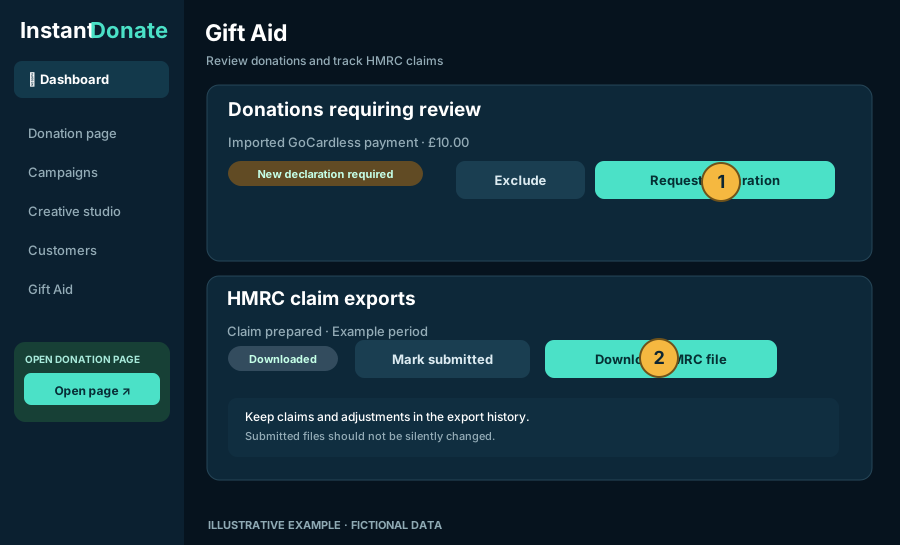
Declaration-aware reviewImported GoCardless payments require a decision; a single-donation declaration does not automatically cover later payments.
Donor-controlled updatesSend secure declaration links for supporters to approve broader Gift Aid coverage themselves.
Claim historyDownload an HMRC-format ODS file and record submission, payment, rejection and adjustments.
Important: InstantDonate helps prepare files and track their status. The charity submits claims to HMRC itself; downloading or marking a file submitted does not send it automatically.
How Gift Aid exports work
Illustrative Gift Aid workspace with declaration review and HMRC claim export actions
Example Gift Aid workflow · Fictional amounts
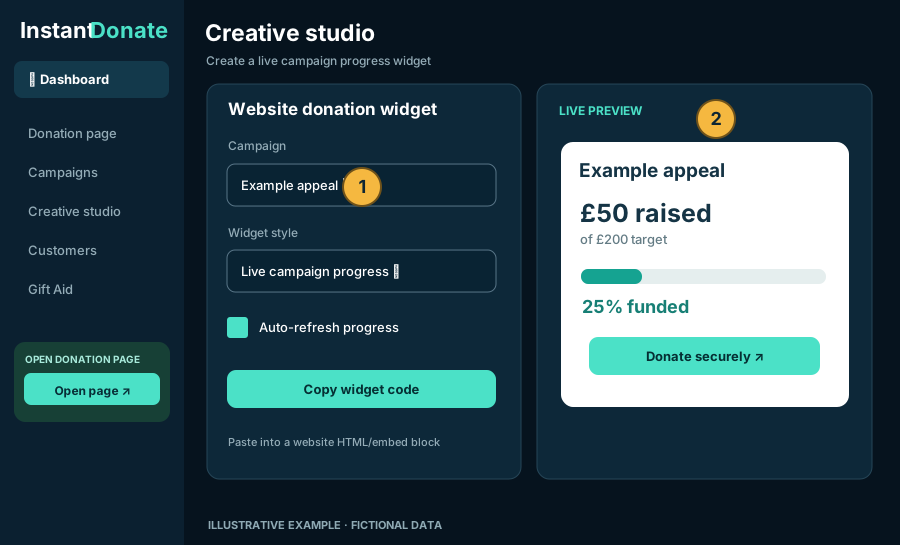
Illustrative website widget builder with live progress preview and copy embed code
Example website widget · Live progress refreshes while visible
PROMOTE WHERE YOUR SUPPORTERS ARE

Take your campaign beyond InstantDonate.

Share a donation link, print a scannable QR poster, publish social assets or embed public campaign progress on your own website.

Copyable donation linksOpen or copy the right charity or campaign URL in a tap.
Live progress widgetsDisplay confirmed donations in an HTTPS website embed, with an InstantDonate-hosted donation button.

Website builders must allow iframe embeds. Sandbox widgets show test fundraising totals, not real collections.

Learn how to embed a widget
HOW IT WORKS

From setup to supporter action.

InstantDonate handles the workspace; GoCardless handles secure payer authorisation.

01

Connect securely

Create a charity workspace and connect through GoCardless. Complete its verification steps before collecting donations.

02

Build and share

Customise a donation page, create an appeal and share its links, QR codes or campaign creative.

03

Manage fundraising

Review your customers, regular giving, payment updates and Gift Aid tasks in the same workspace.

FREQUENT QUESTIONS

Good to know before you start.

Does InstantDonate replace GoCardless?

No. InstantDonate connects to a charity's own GoCardless account. GoCardless handles hosted payment/mandate authorisation, while InstantDonate provides fundraising pages and charity-facing workflows.

Can we manage an existing supporter’s recurring donations?

Yes, once their relevant GoCardless customer and mandate information has been linked and synced. Eligible subscriptions can be created, edited, paused, resumed or cancelled, and a replacement mandate can be requested. Some actions depend on the current GoCardless status.

Does InstantDonate send Gift Aid claims to HMRC?

No. It helps you review declaration coverage, prepare HMRC-format ODS export files, and track the claim process. The charity must submit the claim to HMRC and verify its eligibility and donor information.

Can we embed donation forms directly into our website?

You can embed public campaign progress widgets and use donation buttons or links. Supporters complete payment authorisation through InstantDonate's GoCardless-hosted flow; InstantDonate does not embed a bank-details form into your website.

Is InstantDonate accepting real donations today?

Not through the current Sandbox environment. InstantDonate is currently configured for GoCardless testing. Test campaigns, payments and widgets must not be presented as real fundraising results.

READY TO EXPLORE?

See what your charity could build.

Create a sandbox workspace, explore the features and use the Help Centre to guide your first setup. No real donations are collected in Sandbox.